MCP Servers, what on Earth are they?
Introduction
At first glance, Model Context Protocol may look daunting, but in fact it is far easier than you think!
Model Context Protocol, or MCP, is an open standard made by Anthropic (the company behind Claude AI) as a way to help connect traditional data sources such as backend databases with AI technology such as language learning models, so that they can easily talk to one another. This reduces the barrier between the two systems, and thus means AI can take live, real time data and make decisions on the fly, as opposed to the traditional way of these models using old information it has trained on.
The most popular way that the MCP server connects to this traditional data, is through APIs. However, most LLMs do not have the knowledge of how to use an API, and rather than going to the complexity of programming it so that it is compatible, we can use plain English so that the LLM can easily understand it.
Exploring MCP - The Spothole API MCP
I decided to have a go at creating my own MCP server, so I used an application programming interface (API) called Spothole. Spothole is an API that retrieves "spots" for amateur radio - a spot is a way for someone to tell people over the Internet that they are on a certain frequency, and are looking to make contacts. Ian Renton aggregates these spots from different providers into one API, which means we can access all of them from one place.
The main endpoint I was interested was the GET endpoint to /spots, where we can get the spots, based on parameters such as the continent it is from, what transmission mode, what amateur radio band, and other parameters.
mcp = FastMCP(
    name="Spothole API MCP Server",
    instructions="This server fetches spots and alerts via the Spothole API")

SPOTHOLE_API_URL = "https://spothole.app/api/v1/"

class SpotInput(BaseModel):
    limit: Optional[int] = None
    max_age: Optional[int] = None
    source: Optional[str] = None
    band: Optional[str] = None
    mode: Optional[str] = None
    mode_type: Optional[str] = None
    dx_continent: Optional[str] = None
The beginning of this file is where we instantiate the MCP server instance, alongside creating a Spot Input Base Model, that will act as the framework of what information we can provide to limit what we get back. This ensures that the LLM gives the correct input to the tool.
@mcp.tool()
def get_spots(data: SpotInput):
    """
    Fetch the latest spots based on different filters.

    Parameters:
        limit (int): The limit to the amount of spots returned. This should generally be default of 100 unless specified by the user explicitly.
        max_age (int): The time in seconds that the spots should be limited by. Default should be 6 hours
        source (str): Limit the spots to only ones from one or more sources. To select more than one source, supply a comma-separated list.
        band (str): Limit the spots to only ones from one or more bands. To select more than one band, supply a comma-separated list.
        mode (str): Limit the spots to only ones from one or more modes. To select more than one mode, supply a comma-separated list.
        mode_type (str): Limit the spots to only ones from one or more mode families. To select more than one mode family, supply a comma-separated list.
        dx_continent (str): Limit the spots to only ones where the DX (the operator being spotted) is on the given continent(s). To select more than one continent, supply a comma-separated list.

    Valid parameter strings:
        source (str): "POTA" "SOTA" "WWFF" "WWBOTA" "GMA" "HEMA" "ParksNPeaks" "ZLOTA" "WOTA" "BOTA" "Cluster" "RBN" "APRS-IS" "UKPacketNet"
        band (str): "160m" "80m" "60m" "40m" "30m" "20m" "17m" "15m" "12m" "10m" "6m" "4m" "2m" "70cm" "23cm" "13cm"
        mode (str): "CW" "PHONE" "SSB" "USB" "LSB" "AM" "FM" "DV" "DMR" "DSTAR" "C4FM" "M17" "DIGI" "DATA" "FT8" "FT4" "RTTY" "SSTV" "JS8" "HELL" "BPSK" "PSK" "BPSK31" "OLIVIA" "MFSK" "MFSK32" "PKT"
        mode_type (str): "CW" "PHONE" "DATA"
        dx_continent (str): "EU" "NA" "SA" "AS" "AF" "OC" "AN"

    Returns:
        list[dict]: A list of spots.
    """

    params = data.model_dump(exclude_none=True)

    resp = httpx.get(f"{SPOTHOLE_API_URL}spots", params=params)

    if resp.status_code != 200:
        raise Exception(f"API error {resp.status_code}: {resp.text}")

    return resp.json()
We then declare the get_spots mcp tool as a function - the docstring below it acts as a prompt for the AI, and in my case I found it useful here listing the accepted parameters alongside adding in some defaults. The parameters are then sent as a request to the Spothole API, and is returned if successful to the MCP tool, for further processing by the LLM.
MCP Prompt generation
We can also get the MCP server to generate a prompt for the end user. This can be helpful if the user does not feel they can form a prompt that will be understood by the LLM.
@mcp.prompt
def get_5_spots_for_certain_scheme_prompt(
    source: str,
    band: str = None,
    mode: str = None,
) -> str:
    """Creates a prompt to get the last 5 spots for a certain amateur radio scheme."""
    prompt = f"Please get the last five spots for {source}."
    if band:
        prompt += f" Only get it for the {band} band."
    if mode:
        prompt += f" Restrict to the mode of {mode}."
    return prompt
The above prompt gets the last 5 spots for a certain scheme, such as Parks on the Air or Summits on the Air. We also give the user the ability to provide a band and mode, so that it limits what the spots should be based upon.
What is the outcome?
To test this MCP server, I used FastMCP's cloud service that automatically deploys an MCP server with the latest changes each time I commit, meaning I could test the prompt generator and the actual MCP tool itself. Included in FastMCP cloud is "ChatMCP", an AI LLM provided by FastMCP to test your MCP Server out.
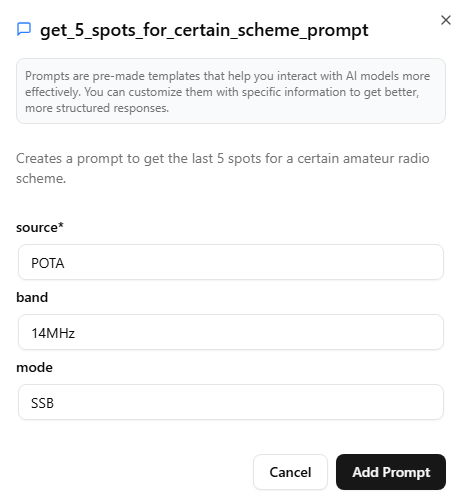
We can see that the user creates the prompt by filling in key sections, which generates an Prompt that the LLM then knows to use the MCP tool, get_spots, to get the spots.
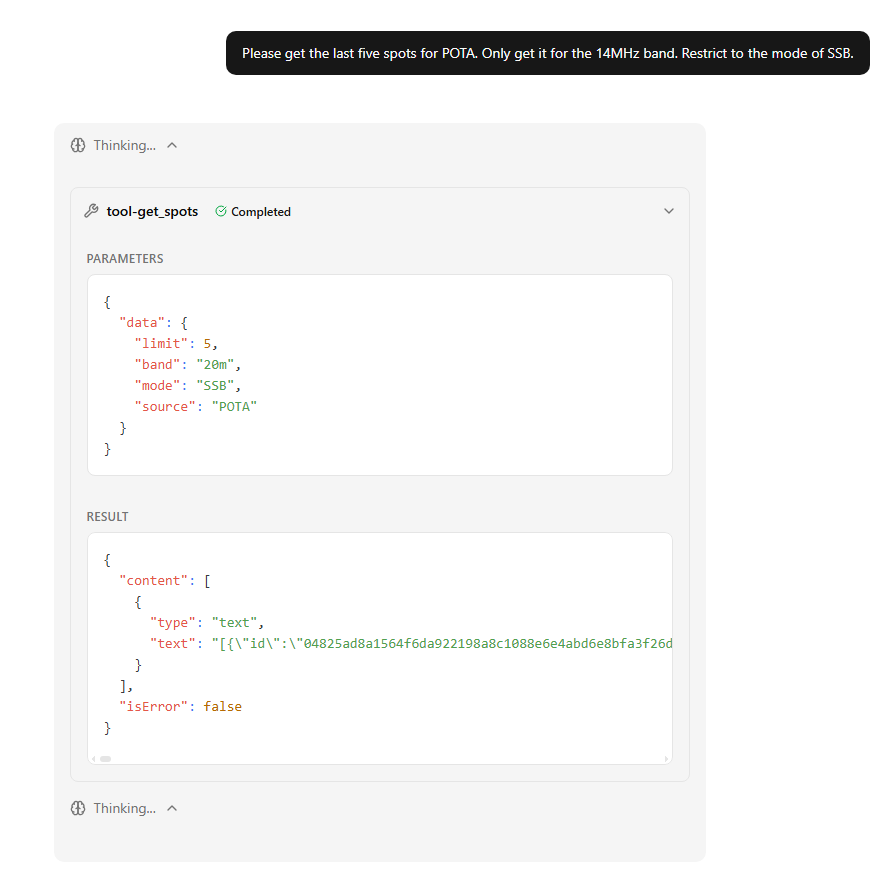
The LLM knows that 14MHz is not a "band", so converts it to the 20m band, which it assumes the user means, and produces an output.
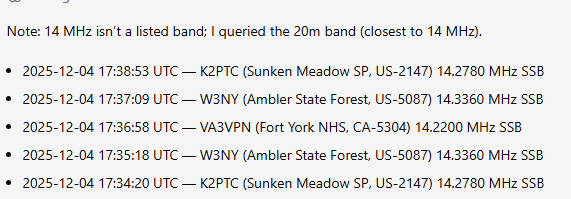
Overall, it provides a fairly accurate result back from the Spothole API, and gives it back in a format it thinks the user it likes. In further experimentation I have tried restricting to a certain country, which takes longer but it seems to be successful at. The shortcoming is that it sometimes does not de-duplicate spots, so if there are many spots from the same person on a certain frequency, it will list all of them, however I think the prompt could be adjusted to stop this.
MCP servers are great for working with APIs to provide real-time insights into data, this example is quite simplistic but I am planning to build upon it by adding in geomagnetic forecasts and look to see if the LLM has knowledge on the different amateur radio band's distance in certain times of the day, to provide the user with spots that they can likely work.